Using the Elm Architecture - Part 3: Managing side effects
May 06, 2026
This blog post is part of a series where we’re using The Elm Architecture (TEA). If you haven’t, I strongly recommend reading the previous articles first.
In the previous post, we’ve implemented our first application using our ElmishView and we saw how to render and update our Model. However, our application’s logic didn’t have to produce any kind of side effect (like API calls), making this example unrepresentative of most of the actual use cases.
Today, we will navigate into a new app and focus on the use of Effect to handle asynchronous and non-deterministic behaviors.
All the following code is available in my github repository.
The use case
Our application is a simple page that displays and allows edition of customers’ information. For simplicity, a customer is defined by an id, a name and a premium subscription status. Only the premium subscription status can be updated by the view.
Here’s how our final application should behave:
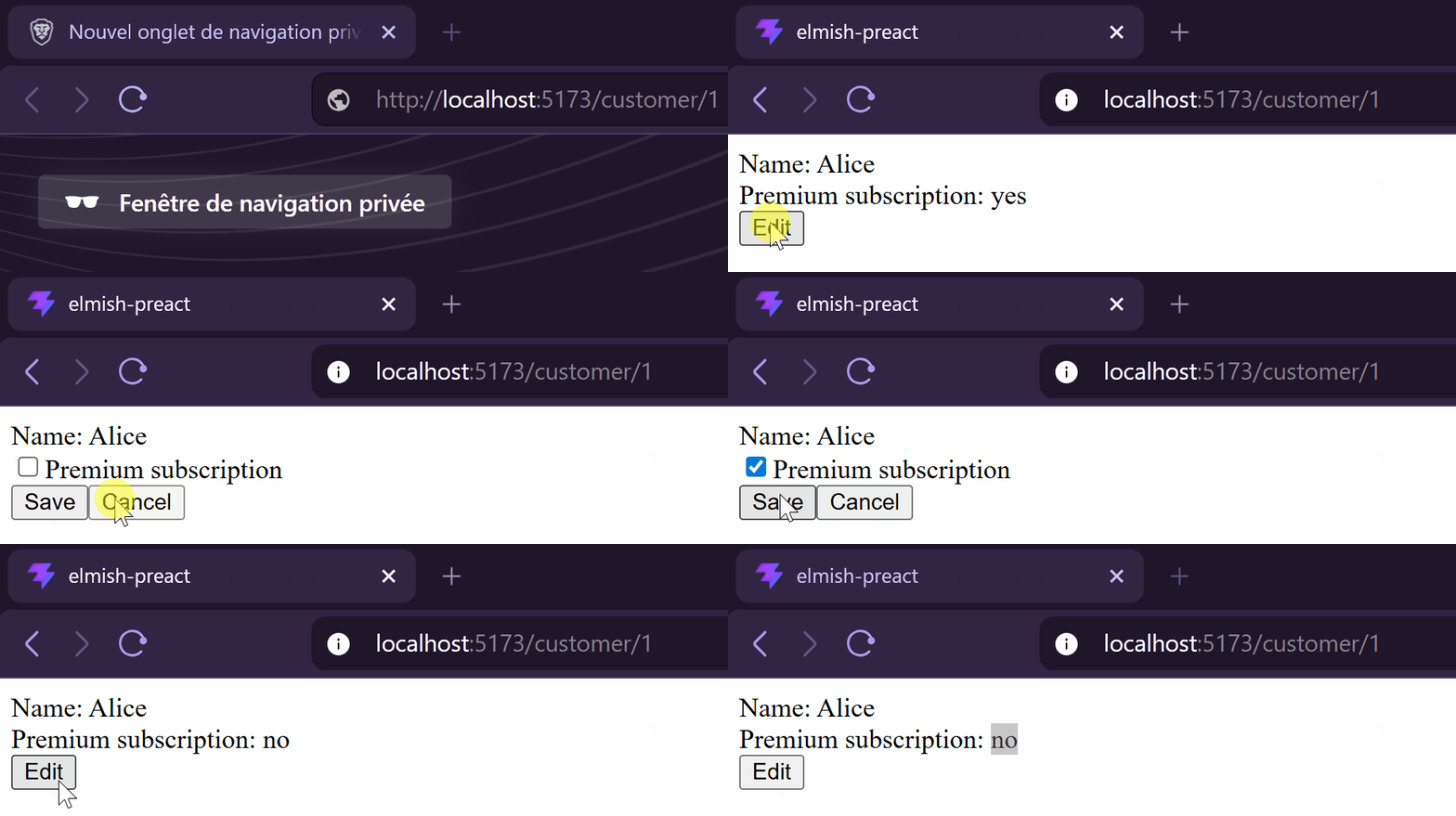
As we should be able to display different customers, we retrieve the customer’s id from the URL, then we load and save its information with some API calls.
Our API contract looks something like this:
// customer/api.ts
export type CustomerId = number
export type CustomerDto = {
    id: CustomerId
    name: string
    premiumSubscription: boolean
}

export interface Api {
    loadCustomer: (id: CustomerId) => Promise<CustomerDto>
    saveCustomer: (customer: CustomerDto) => Promise<void>
}
However, with everything we’ve learned so far, our type system doesn’t handle any side effect:
// customer/customer.app.ts
export type Model = {
    customerId: CustomerId
    loading: boolean
    error: string | null
    customer: CustomerDto | null
    customerEdition: CustomerDto | null
}

export type Command =
    | { kind: "EditCustomer" }
    | { kind: "UpdatePremiumSubscription", value: boolean }
    | { kind: "SaveCustomer" }
    | { kind: "CancelEdit" }

export type Effect = never

export function init(customerId: CustomerId) : { model: Model, effects: Effect[] } {
    return {
        model: {
            customerId: customerId,
            customer: null,
            error: null,
            customerEdition: null,
            loading: true,
        },
        effects: [],
    }
}
You may have noticed this time our init function receives a CustomerId as a parameter to initialize our application. For now, the SaveCustomer command does nothing more than switching the loading flag.
Loading the customer
The first thing we have to do is to launch an API call to retrieve the customer. Unfortunately, these are asynchronous and non-deterministic, so we should avoid making such calls in our update function that is synchronous and pure.
To query our customer, we’ll use an Effect and then dispatch a Command with the result returned by the API.
  flowchart LR
    init@{shape: circle}
    success@{label: "dispatch NotifyCustomerLoaded cmd", shape: stadium}
    failure@{label: "dispatch NotifyLoadingError cmd", shape: stadium}
    init --> |LoadCustomer| executeEffect
    executeEffect --> R{API call Success?}
    R --> |Yes| success
    R --> |No| failure
We begin by updating our types, we add our new Effect and two new commands:
// customer/customer.app.ts
export type Command =
    | { kind: "NotifyCustomerLoaded", customer: CustomerDto }
    | { kind: "NotifyLoadingError", error: string }
    | // ...

export type Effect =
    | { kind: "LoadCustomer", customerId: CustomerId }
Then we update our init function to return the LoadCustomer effect. With this, an API call will be triggered every time we navigate to this page:
// customer/customer.app.ts
export function init(customerId: CustomerId) : { model: Model, effects: Effect[] } {
    return {
        model: {
            // ...
        },
        effects: [
            { kind: "LoadCustomer", customerId }
        ],
    }
}
Now, we must handle our effect inside the executeEffect function. But first, we update the function’s signature to gain access to the Api.
// customer/customer.app.ts
export function executeEffect(effect: Effect, dispatch: Dispatch<Command>, api: Api) : Promise<void> {
Obviously, our ElmishView component is still expecting a function with two parameters, so we declare and pass an override with the API encapsulated:
// customer/index.tsx
export function Customer({ customerId } : { customerId: string }) {
    function executeEffectWithApi(effect: Effect, dispatch: Dispatch<Command>) {
        return executeEffect(effect, dispatch, fakeApi)
    }

    return <ElmishView
        init={init(parseInt(customerId))}
        update={update}
        executeEffect={executeEffectWithApi}
        view={(model: Model, dispatch: Dispatch<Command>) =>
            <View model={model} dispatch={dispatch} />
        }
    />
}
For this example, I’ve implemented a
fakeApiwith a set of static data. ThePromisereturns a result after a delay of one second, allowing me to see the loading display on my view.
Implementing executeEffect is quite simple. We call our Api and return a success or an error depending on the Promise:
// customer/customer.app.ts
export function executeEffect(effect: Effect, dispatch: Dispatch<Command>, api: Api) : Promise<void> {
    return match(effect)
        .returnType<Promise<void>>()
        .with({ kind: "LoadCustomer" }, ({ customerId }) => {
            return api.loadCustomer(customerId)
                .then(customer =>
                    dispatch({ kind: "NotifyCustomerLoaded", customer })
                )
                .catch((_error: unknown) =>
                    dispatch({ kind: "NotifyLoadingError", error: "Error while loading customer" })
                )
        })
        .exhaustive()
}
This can be unit-tested as well but it gets more complicated than testing the update function, because we’ll have to mock or fake our Api dependency. What’s why I would advise you to put the minimum logic there, just return the result into the Command and let the update function do the job. In this use case, it’s just removing the loading state and setting either the customer’s data or the error:
// customer/customer.app.ts
export function update(command: Command, model: Model) : { model: Model, effects: Effect[] } {
    return match(command)
        .returnType<{ model: Model, effects: Effect[] }>()
        .with({ kind: "NotifyCustomerLoaded" }, ({ customer }) => {
            const newModel: Model = {
                ...model,
                customer,
                loading: false,
            }
            return { model: newModel, effects: [] }
        })
        .with({ kind: "NotifyLoadingError" }, ({ error }) => {
            const newModel: Model = {
                ...model,
                error,
                loading: false,
            }
            return { model: newModel, effects: [] }
        })
        // ...
        .exhaustive()
}
Saving the customer
Saving the customer follows the same flow, so there’s no point for me to detail every step. We declare and handle a new Effect and two Command. In the existing logic, we just need to update the SaveCustomer command handling to return our new Effect:
// customer/customer.app.ts
export type Command =
    | // ...
    | { kind: "SaveCustomer" } // Already declared
    | { kind: "NotifySaveSucceeded" }
    | { kind: "NotifySaveFailed", error: string }

export type Effect =
    | // ...
    | { kind: "SaveCustomer", customer: CustomerDto }

export function update(command: Command, model: Model) : { model: Model, effects: Effect[] } {
    return match(command)
        .returnType<{ model: Model, effects: Effect[] }>()
        // ...
        .with({ kind: "SaveCustomer" }, () => {
            if (!model.customerEdition) return { model, effects: [] }

            const newModel: Model = {
                ...model,
                loading: true,
            }
            const effects: Effect[] = [
                { kind: "SaveCustomer", customer: model.customerEdition }
            ]
            return { model: newModel, effects }
        })
        .with({ kind: "NotifySaveSucceeded" }, () => {
            const newModel: Model = {
                ...model,
                customer: model.customerEdition,
                customerEdition: null,
                loading: false,
            }
            return { model: newModel, effects: [] }
        })
        .with({ kind: "NotifySaveFailed" }, ({ error }) => {
            const newModel: Model = {
                ...model,
                error,
                loading: false,
            }
            return { model: newModel, effects: [] }
        })
        .exhaustive()
}

export function executeEffect(effect: Effect, dispatch: Dispatch<Command>, api: Api) : Promise<void> {
    return match(effect)
        .returnType<Promise<void>>()
        // ...
        .with({ kind: "SaveCustomer" }, ({ customer }) => {
            return api.saveCustomer(customer)
                .then(() =>
                    dispatch({ kind: "NotifySaveSucceeded" })
                )
                .catch((_error: unknown) =>
                    dispatch({ kind: "NotifySaveFailed", error: "Error while saving customer" })
                )
        })
        .exhaustive()
}
Conclusion
In this post, we learned how to perform non-deterministic and asynchronous operations within our Elm Architecture. This may seem like a cumbersome process with a lot of indirection to make a single API call, but it isolates side effects, protecting the rest of the code base and keeping it easier to understand and maintain. In my opinion, this is a good tradeoff.
Next week’s post will be the last in this series, we will see how to handle larger applications by extracting and using subcomponents.
Comments
Wish to comment? Please, add your comment by sending me a pull request.